Voyager Receiver Configuration
Voyager Receiver Remote Programming Guide

Quick guide for setting up a MASTER REMOTE, adding additional remotes, identifying the MASTER REMOTE, and erasing receiver memory on Voyager receivers

1. Learning the MASTER REMOTE
(For new or erased receivers)
Ensure power is connected to the Voyager receiver.
Press and hold any button on a Nova remote for at least 5 seconds.
The RED LED will illuminate and trigger the gate.
The first remote learned becomes the MASTER REMOTE.
Important:
• Clearly mark the MASTER REMOTE, as it is required to add more remotes.
Please note the LED light indication in the image below:
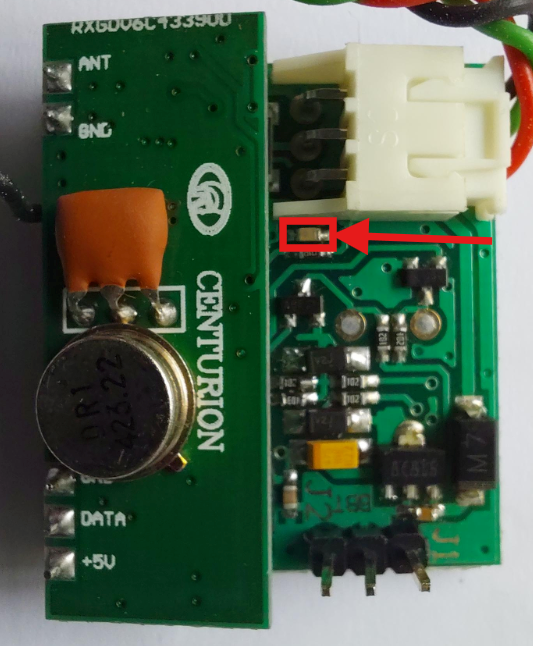
Please note the LED light indication in the image below:
2. Learning Additional Remotes
Press and hold any button on the MASTER REMOTE for approximately 10 seconds (or until the RED LED flashes 10 times).
Release the button to enter LEARN MODE.
While the RED LED remains ON, press the button on the new remote to program it.
The receiver exits LEARN MODE after 10 seconds of inactivity.
3. Lost MASTER REMOTE
Identifying the MASTER REMOTE:
• Press a button on the remote while observing the RED LED.
• The MASTER REMOTE will cause:
One long flash
Followed by one short flash
If Lost:
• The receiver memory must be erased before a new MASTER REMOTE can be programmed.
• All remotes will need to be re-learned.
4. Erasing Receiver Memory
Link jumper J1 or J2 with the middle pin.
The RED LED will flash 11 times.
Remove the link after the 11 flashes while the LED remains ON.
The receiver memory will be erased.
The RED LED will turn OFF once complete.
Please take note of the programming pins shown below:
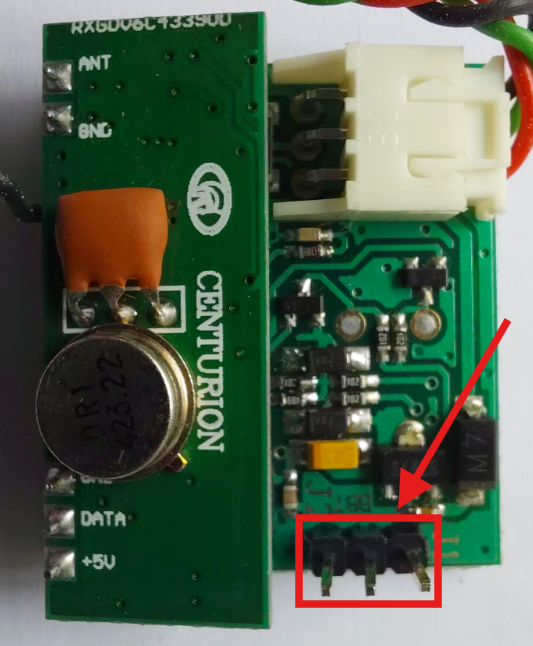
Please take note of the programming pins shown below:
Important:

• Erasing memory removes all programmed remotes.
Please feel free to reach out to us on our WhatsApp Support line at 083 650 4010 should you require any further assistance.